03 January 2009

"Error ... ../php.vim" Update

I wrote about this annoying "E10" error once before. It doesn't crash anything, it just gives a long error message and pause (/"Enter to continue") every time you open a php file in vim with syntax high-lighting enabled. It's probably triggered by other syntax rule files as well. (Several variants of vim are found in FreeBSD ports under the editors category.)

I wrote to the port maintainer and he pointed out that the "problem" file, "php.vim", is not modified by the ports system. So, I poked around the vim site -- I couldn't possibly be the only person who's run into this -- and I found a setting that can prevent this problem. The E10 error message is described here. The issue is simply a vi-compatibility option that prevents vim from allowing backslashed line-continuations in sourced files (like the php.vim syntax rules script). The error will no longer appear when you disable this option with this vim command:
:set cpo-=C
... which can be put into your vimrc file. Which should be "~/.vimrc" for your personal startup file and "/usr/local/share/vim/vimrc" for the system-wide file. (You may need to create the system-wide file.) ... A much more elegant solution than modifying the php.vim file!

With great functionality comes great complexity.

Still, there's a better solution that avoids the error from the beginning regardless of the 'cpo' options: the vim developers ought to modify the php.vim file to remove the backslashed line-continuations. I'm all for neatly formatted code -- but not at the expense of user irritation!

Labels:

24 November 2008

alias or function? and bash 'time'

In a previous post (and a follow-up), I wrote about a number of useful and time-saving aliases that I use in the bash shell. Those posts are pretty old now. In the meantime, I've defined another interesting alias. While nothing special in itself, I've discovered that this is one task that can be done better in another way.

The new alias is this:
pig='pkg_info | grep '

I've found it to be very useful. I often want to know what version of some port is installed, or if I have a port installed at all, and this allows me to find out quickly without paging through the whole list. For example:
mybox$ pig swfdec
swfdec-0.6.8 Flash Rendering Library
swfdec-plugin-0.6.0_1 Flash rendering plugin

It's very much like the alias "psg='ps auxw | grep '" that I'd talked about previously.

But, on a box with a large amount of software installed -- which is pretty well any FreeBSD desktop now that we have modular X -- this new command is pretty slow. Let's use bash's time utility and see just how slow:
mybox$ time pig swfdec
swfdec-0.6.8 Flash Rendering Library
swfdec-plugin-0.6.0_1 Flash rendering plugin

real 0m13.245s
user 0m0.306s
sys 0m0.233s

Thirteen seconds, wow! Immediate, subsequent re-invocations should go much faster since the file information has been cached. See:
mybox$ time pig swfdec
swfdec-0.6.8 Flash Rendering Library
swfdec-plugin-0.6.0_1 Flash rendering plugin

real 0m0.416s
user 0m0.258s
sys 0m0.163s

But, the underlying problem remains: pkg_info spends a lot of processing time going through all the installed ports, and we're only interested in one (or a few). We can do better.

Knowing that the package information is found in the directory '/var/db/pkg/' and how it's structured, we can use filename expansion and a couple of other tricks to dramatically reduce these times. After some fiddling, this is what I've come up with:
pi2 ()
{
RND=$RANDOM;
cd /var/db/pkg/;
cat *${1}*/+COMMENT > /tmp/pig.$RND;
echo *${1}* | sed 's/ /\
/g' | paste - /tmp/pig.$RND;
rm /tmp/pig.$RND;
cd $OLDPWD
}

I call it 'pi2' here for the sake of clarity. Yes, that's a literal newline for the sed replacement string (might cause problems with some versions of sed :/ ).

This function dramatically reduces times. Compare these times with those above:
mybox$ time pi2 swfdec
swfdec-0.6.8 Flash Rendering Library
swfdec-plugin-0.6.0_1 Flash rendering plugin

real 0m0.015s
user 0m0.001s
sys 0m0.023s

And, these fast times stay nearly the same when the file information is not cached. Which takes away that pesky 10 plus second wait when you want to use this utility and the file information doesn't happen to be cached already.

Labels: ,

10 November 2008

"Error detected while processing ../php.vim"

Here's a minor irritation with the vim port (editors/vim-lite, and probably the others). When I go to edit a php file I get this non-fatal error:

"~/somefile.php" 99 lines, 2345 characters
Error detected while processing /usr/local/share/vim/vim72/syntax/php.vim:
line 479:
E10: \ should be followed by /, ? or &
line 482:
E10: \ should be followed by /, ? or &
line 488:
E10: \ should be followed by /, ? or &
line 489:
E10: \ should be followed by /, ? or &
line 490:
E10: \ should be followed by /, ? or &
[etc.,etc.]
Press ENTER or type command to continue

This is with vim-lite-7.2.14, but it was happening on vim-lite-7.1.x too. The fix is pretty easy, we just have to edit the php.vim file and remove the syntax errors. All of the errors reported are the same and look like they were intended to be line continuations for neatness (that vim just does not like). I saved a copy of the original before I did this and here a snippet of the diff:

478,479c478
< syntax keyword phpSpecialFunction containedin=ALLBUT,phpComment,phpStringDouble,phpStringSingle,phpIdentifier
< \ __construct __destruct __call __toString __sleep __wakeup __set __get __unset __isset __clone __set_state
---
> syntax keyword phpSpecialFunction containedin=ALLBUT,phpComment,phpStringDouble,phpStringSingle,phpIdentifier __construct __destruct __call __toString __sleep __wakeup __set __get __unset __isset __clone __set_state


That's probably going to be hard to read. But, the issue is that all the lines beginning with " \ " need to be joined to the line before them and the "\" should be removed. That's it. In the case where there are several of these lines in a row, they should all be joined to the line preceding them, and all of the backslashes removed. (Into one really long line, yes.)

I guess I'll be a good user and submit a patch. :P

UPDATE
See this update, with new information (including a better solution).

Labels:

17 June 2008

Firefox Download Day

Download Day - EnglishHere is a fun thing that Firefox is trying to do: set the Guinness World Record for most downloads in a day, to promote their new browser. Wow, I have been using Firefox on FreeBSD since well before version 1.0 and it has served me well.

So, the question is, how do we FreeBSDers (and other non-Windows users) participate? I can't say for sure -- I looked over their FAQ and they didn't go into that much detail. However, I will assume that if I download the source code from a mozilla.org server during the "Download Day" that that will count.

How should we go about figuring out what to download? The make target 'fetch-list' is your friend here. The new Firefox is located at '/usr/ports/www/firefox-devel/' in the ports tree. If you go to that directory and run 'make fetch-list' it will output all locations that the ports system knows about to download the source code from. Just pick out the ones that are in the 'mozilla.org' domain, and you should be in business. It looks like this for me (with a little sed magic to make it more legible):

$ make fetch-list | sed 's/ || /\
> /g'
/usr/bin/env /usr/bin/fetch -ApRr -S 33867426 http://ftp.mozilla.org/pub/mozilla.org/firefox/releases/granparadiso/alpha2/source//granparadiso-alpha2-source.tar.bz2
/usr/bin/env /usr/bin/fetch -ApRr -S 33867426 http://www.gtlib.cc.gatech.edu/pub/mozilla.org/firefox/releases/granparadiso/alpha2/source//granparadiso-alpha2-source.tar.bz2
/usr/bin/env /usr/bin/fetch -ApRr -S 33867426 http://mozilla.gnusoft.net/firefox/releases/granparadiso/alpha2/source//granparadiso-alpha2-source.tar.bz2
/usr/bin/env /usr/bin/fetch -ApRr -S 33867426 ftp://ftp.mozilla.org/pub/mozilla.org/firefox/releases/granparadiso/alpha2/source//granparadiso-alpha2-source.tar.bz2
/usr/bin/env /usr/bin/fetch -ApRr -S 33867426 ftp://ftp.belnet.be/packages/mozilla/firefox/releases/granparadiso/alpha2/source//granparadiso-alpha2-source.tar.bz2
/usr/bin/env /usr/bin/fetch -ApRr -S 33867426 ftp://ftp.fh-wolfenbuettel.de/pub/www/mozilla/firefox/releases/granparadiso/alpha2/source//granparadiso-alpha2-source.tar.bz2
[snip]

Oh yeah, I need to update this ports tree bad! But, after that I should be getting a later code tarball in this output that should count. I may also manually ftp to their site and make double sure it's the latest for the new version. The ports tree could be lagging if they are releasing the code right before download day.

I sure hope this will count toward the record!

(Update: [Updated again] I checked the Mozilla ftp site and the release code for 3.0 can be fetched from here: ftp://ftp.mozilla.org/pub/firefox/releases/3.0/source/firefox-3.0-source.tar.bz2 . ('http' should work too.) Be sure to leave this tarball in your '/usr/ports/distfiles' directory so it will be there when the port is ready for it!)

Reports are that the official download day begins at 1000 PST today (June 17th, 2008). That's confusing, since I'm in the states and on daylight savings time right now. (I hate daylight savings time.) So, didn't they mean PDT? Argh. So, it starts at either 1700 UTC or 1600 UTC (or, let's be honest, it may be 1800 UTC, because humans and time zone conversions are not compatible).

Another Update! I don't believe grabbing the RC source is sufficient. After rereading the DLD FAQ, I see that it says that Download day (DLD) starts with "the general availability of Firefox 3". So, I'll check for the release source tarball later. (Wasn't there this morning. (Was now and I've updated the ftp link above.)) ... Also, the 1700 UTC DLD launch has been missed. (ended up being 1816 UTC, as per Twitter.) See this post on the Mozilla blog. ... If the RC download page is any guide, linux users may be able to download an official binary. ... Finally, this Twitter page may be useful for up-to-the-minute information.

Really, really last update: The official DLD page confirms it -- you have until 1816 UTC today (June 18th) to complete your qualifying download. A commenter has pointed out that only downloads via the Mozilla web site will be counted.

Labels: ,

24 May 2008

Windows game high scores not saved

Something possessed me to install Snood on the kids' computer again. That's a great, little game. (If you want the same basic game in FreeBSD, take a look at "games/frozenbubble" or "games/monkeybubble" in ports.)

But, after a day of play, we noticed something horrible. Most high scores were not being saved! I've had this issue before with some other Windows games so it was no great mystery. On the kids' Windows XP, only I have administrative rights.* So, after I installed the game, the high scores file (whatever and wherever that was) was only writable by me. When they log in and play, their high scores are not saved.
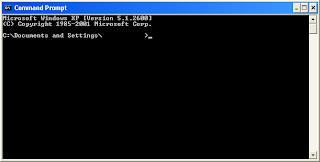
So, let's fix this. As far as I know, this must be done via the command-line. (I'm doing all of this in XP, BTW. If you're running another version of Windows I don't know which parts of this will work, if any.) Open the "Command Prompt," found under "All Programs> Accessories" in the Windows menu.

Next, you've got to find the file where the high scores are saved. This is not necessarily as hard as it sounds. In the case at hand, I've played and saved a high score successfully, so the file in question should have a modification time that is later than any other file. I've installed the game in the directory "C:\Program Files\games\Snood 4" and if I "cd" there and then run "dir /o:d", I can easily see that "SnoodPrf.40W" is that file:
C:\Program Files\games\Snood 4>dir /o:d
Volume in drive C is SOMETHING
Volume Serial Number is X-YYYY

Directory of C:\Program Files\games\Snood 4

11/08/2001 03:27 AM 237,568 glut32.dll
07/31/2006 02:14 AM 38,928 Agency.fnt
08/08/2006 09:31 AM 6,022 HelpLB.txt
05/18/2007 12:41 AM 268,304 Lexia.fnt
01/22/2008 03:31 AM 77,204 Snood 4.0 ReadMe.rtf
03/15/2008 05:04 PM 18,182,144 Snood.exe
05/22/2008 12:37 AM 685,849 unins000.exe
05/22/2008 12:38 AM 2,332 unins000.dat
05/24/2008 08:40 PM <dir> .
05/24/2008 08:40 PM <dir> ..
05/24/2008 08:40 PM 10,820 SnoodPrf.40W
9 File(s) 19,509,171 bytes
2 Dir(s) 80,384,868,352 bytes free

Now for the fun part. We'll need to use the little known Windows program "cacls" to make that file world "changeable". Use some care with this utility. First, run "cacls /?" to see the basic usage. Of special note, always (always) use the "/E" switch so that your changes to the file ACLs don't replace ALL of the existing ACLs. (Yes, it's stupid by default.) Next, just run "cacls <file-of-interest>" to see what the existing ACLs are. There are several in most cases (and if you forget the "/e" switch, you'll have to replace them all, so be careful).

In my case, I can see that what I want is for the unprivileged "BUILTIN\Users" to change from "R" (read access) to "C" (change access). I say "in my case," only because some people may have a more complicated set-up with network users -- but I'd expect the vast majority of people to be in the same boat as myself. So, here's the command that made our high scores work correctly for Snood:
cacls SnoodPrf.40W /E /G "BUILTIN\Users:C"

I've done this once before for another old Windows game, Worms Armageddon (WA). (A great game, BTW. Check "games/wormux" in ports for an open source clone.) With WA, this process was a bit more difficult. First of all, it has a large, multi-directory structure, so it was tough to find the right file. (It was "<WA-top-level>\User\Teams\WG.WGT".) Second of all, the "C"/change access was not sufficient for the regular users to update the file. I don't know why, but in that case I had to grant full access to the file for the scores and saving to work correctly. Keep that in mind, in case you're trying to fix high scores on some other game. Good luck!

Update
I just (re)installed ThinkTanks for the kids. (Another fine game.) But, it also has score/profile saving issues in Windows. To fix, change to the "<TT-top-level>\game\client" directory and update the ACLs (as above) of these four files:

prefs.cs.dso
players.cs.dso
players.cs
prefs.cs


Update 2!
I'm not intending to catalog every Windows game with this issue. But, I've found another one that has put their save files in an unusual place. It is "Luxor 2" by MumboJumbo. It creates a directory, "C:\Documents and Settings\All Users\Application Data\MumboJumbo\luxor2", that all users need to have full access to. And, the files within and sub-directories as well. So, 'cacls luxor2 /t /e /g "BUILTIN\Users:F"' ought to do it.

* I'll have to write about Windows security some time. But, a big part of any reasonable security plan for Windows is ensuring that everyone logs in under their own username and not with administrator rights!

Labels: , ,

01 April 2008

FreeBSD logo screensavers

I've been playing around with xscreensaver (x11/xscreensaver) and I've done something fun with a couple of the hacks that you'll want to try. There are many hacks that let you use your own image or images. Many of those, like XAnalogTV or Carousel, work best with a large number of pictures that get rotated. There are a couple of hacks that only work on one picture at a time, and what I've done is modified some FreeBSD logos to work well with those.

First up is the "blitspin" hack. It chops an image into quarters and then rotates those 90 degrees and then does that again to each quadrant and so on. The effect is of the image being chopped into a blocky fuzz and then reforming, but turned 90 degrees from the last time it was whole. Repeat forever.

To make blitspin look nice with the logo, I needed to find a large logo that fills a large amount of the screen and then I decided to change the background to black. This way it looks like just the (roughly) circular logo is there (instead of the rectangular image). It took some fiddling around, but it looks pretty good now. Oh, and it's blue -- how's that for a twist? (To use this you just need to run xscreensaver-demo and then choose blitspin>Settings>Advanced and add the option "-bitmap /path/to/blueball.png" to the command there.)

The other hack that's just begging for the FreeBSD logo is "flag". Some of the doc.s are outdated and still say that you have to use a bitmap with the hack. That's not true any longer as it turns out. But, it does look a lot better if you use a small image that shows pixelation. So, I'd already made a little bitmap and that's what I'm sticking with. I like this one the best. (To use it, just like before, run xscreensaver-demo and then choose flag>Settings>Advanced and add the option "-bitmap /path/to/Logo_FreeBSD.xbm".)

I'm not sure what the heck happened to the color on flag, though. I've tried a couple of things to get it working with the undulating colors, but no dice. If you can figure that out, let me know! It still looks great though.

The only other thing you need to start using these is the image files themselves. I would like to have just uploaded them to this post, but blogger always modifies and resizes images so that wouldn't work. I searched for free file hosting and went with the first reasonable place that didn't want me to register. So, here are the links: Logo_FreeBSD.xbm blueball.png. (Obviously, these are meant for personal use only, and any sort of commercial use would require permission from the FreeBSD Foundation.)

If you're lucky enough to be able to run FreeBSD on your computer at school or work (yes, I am :) ), then show it off with a logo screensaver!

Labels: , ,

08 January 2008

Printing from Windows to CUPS

This is too good to wait on, even though it's late and I'm a little tired. May fill in more later. I have a printer. I hate the Windows drivers that come with it, they're full of ads, obnoxious automated update pop-ups, they hog a lot of memory and CPU, etc. That's alright, I usually use FreeBSD anyway and CUPS ends up working great. I had to find the linux drivers for my particular printer in another port (hpijs or hplip (YMMV)), but was not a big deal. I'm printing over the network from FreeBSD. Everybody's happy.

But, I have a Windows machine for the kids and now they're constantly wanting to print things for school. Sometimes they can use the FreeBSD machine, but sometimes it's not convenient. What I want is for the FreeBSD machine to be a print server to the Windows machine.

So, I know!, Windows means samba and there's a port named "cups-samba". This must be just what I'm looking for. ... Well, it was kind of what I was looking for. But, it was too much trying to do things the Windows way. A little painful. What I discovered in digging around was that I didn't need cups-samba or even samba. CUPS by default leaves a port open for printing and you can use IPP to print directly to a CUPS printer via the network, even from Windows, and using generic, Windows Postscript printer drivers already on your Windows machine (probably).

My breakthrough came from a Gentoo wiki (here) where I found this great wisdom on the subject:

I don't understand why this HOWTO includes Samba functionality. It seems to me to be an inappropriate security risk, especially if your goals are simply what this HOWTO is addressing -- setting up a printer on a Gentoo box using CUPS, and using that printer natively with Windows.

Using IPP, you can axe everything in this HOWTO regarding printing via Samba. CUPS setup as per the HOWTO looks good. I use [OPTION 1] setup in my mixed-OS environment:

[OPTION 1] Generic PS Driver using MS Publisher Imagesetter driver

Windows: run Add Printer, select "Connect to a printer on the Internet..." and enter the URL for your printer (http://<computer-ip>:631/printers/<cups-printer-name>). When it asks for a printer manufacturer, select "Generic", and the printer "MS Publisher Imagesetter".


There's not much more to say. It worked perfectly. I printed out a little sudoku puzzle to test it.

Labels: , ,

22 November 2007

Yuck: Undefined symbol "__sbmaskrune"

I have saved tons of compile time in the past by using updated 6-STABLE binary packages, even though I'm running 6.2-RELEASE. (As discussed in past articles here and here.) Well, the last couple of days I gave some of that time back. :/ Packages grabbed from the '/packages-6-stable/' subdirectory are not running for me in 6.2-RELEASE. They would mostly exit immediately with an error message something like this:

/libexec/ld-elf.so.1: bash: Undefined symbol "__sbmaskrune"

Everything worked fine again when I reinstalled those ports by compiling instead of using packages. So, I've gotten all upgraded, it just took a little longer.

It's not really uncommon to have occasional little library problems with the binary packages. Usually that's a minor thing related to one of the dependencies and easily remedied, often by compiling it instead. I'm not sure what's going on in the above case. I'd guess something about system libraries changing in 6-STABLE and the upcoming 6.3.*

Also, I noticed that I'm not alone with this issue. I've seen a couple of related questions on the freebsd-questions mail list (search for "__sbmaskrune") and one of those involved system files. (Whereas, I sort of had the problem in reverse, having 6-STABLE packages that wouldn't run on 6.2.) It's a good time to remember that any STABLE branch is really a development branch and may have issues, however rare.

* Update

This sort of thing isn't supposed to happen, of course. "uunixuser" commenting at bsdforums.org pointed out this commit message which seems to be fixing and backing out the problem.

Update 2

Just to clarify what the problem is(/was): There was a commit that changes some system libraries used by pretty much everything. So that ports compiled on 6-PRE-OOPS would no longer run on 6-OOPS, and vice-versa! My issue was I downloaded 6-OOPS packages and installed them on my 6.2 system. They wouldn't run. Most other people upgraded to 6-OOPS and then suddenly their old ports would not run. Now, the OOPS has been backed out and mappings for the OOPS library changes have been left in, so that a 6-POST-OOPS system should run packages built at any time. ... It's pretty damn confusing, I agree. :) But, the upshot is there's two ways to fix these ports issues: 1) recompile all of the ports. It doesn't matter what version you're on, recompiling will fix the port. (Reinstalling from a binary package may not.) 2) update your system to the latest 6-POST-OOPS. Again, should fix everything. (I haven't tested this myself, but reports are that it works.)

Update 3

And, if you're having build issues this should help (from '/usr/src/UPDATING'):
20071024:
A breakage was introduced in libc and fixed later. Make sure you have lib/Makefile rev 1.205.2.4. If it already breaks your world, you can recover it by

- reboot to single user mode, make sure you use /rescue/sh instead of /bin/sh
- use /rescue/chflags to remove schg flag on /lib/libc.so.6
- use /rescue/cp to copy libc.so.6 from /usr/obj to /lib/libc.so.6
- continue installworld, you should be fine now

Labels:

10 November 2007

Color your (CLI) world!

Here is a quick tip on adding some color to your command line interface (CLI). And, when I say CLI, I mean both the console and your typical graphical terminal as well (xterm, Eterm, etc.).

First, and easiest, is to color the directory listings. There are two ways to do this. One, you can define the variable CLICOLOR in your environment. In bash, you could do this with the command "export CLICOLOR=1". And, if you really like it, then just put that same statement into your ".bash_profile" file and it will become effective every time you log in. See picture above, and then say either "oooh!" or "aaah!"

The other way to do the exact same thing, is to just add the option "G" to your "ls" commands. Above, I could have gotten the exact same output by typing "ls -ltG" regardless of whether the variable CLICOLOR existed in the environment. I guess if you're already using an alias for "ls" this might be a good way to do it. If you're using several aliases for several different sort of "ls" commands, then maybe CLICOLOR would be better. But, they're both easy to set-up and it doesn't much matter which method you use.

Next, let's get some syntax-sensitive color into our text editor. If you use "vi"* and you do any sort of scripting or programming, you should try installing the port "editors/vim". In fact, I install "editors/vim-lite" because I'm really not interested is using the graphical/X vim. Now, if you open any sort of script file that vim can tell is a script or program**, all you've got to do is enable the syntax setting by typing ":syntax enable" (make this automatic by putting it into your "~/.vimrc" file, colon and all). Once this setting is enabled, vim will color the different words and comments on the screen according to the syntax of the appropriate language -- as long as it has rules settings for that language -- and it has rules already for most. I can tell you it works nicely out of the box for shell and python scripts. If you don't have any scripts or code files handy, see the magic at work on one of the scripts that's already on a FreeBSD box. Maybe try, "vim -R /etc/rc.sendmail". See the screen snip below. Say "aaah!" or "oooh!" as appropriate.


Being an old crank, I've been known to poo-poo this fancy color stuff. By golly, when I was your age we had amber-only WYSE terminals that burned off your eyelashes and warmed all coffee within a 5 foot radius! But, I've got to admit, once you've had a taste of this syntax-sensitive, visual sugar, there's no going back. It really helps you to take in your scripts a lot quicker. And, once you're used to it, you'll howl the next time you have to script or program without it.

*(If you don't use "vi", then I recommend it as a great CLI tool -- and, obviously, its clone "vim", too. Be aware that they're not really, really easy to learn. :) But, they're worth the trouble and can help you to navigate and change files much more quickly than any standard editor.)
**(The way vim normally tells which syntax to use is via the interpreter defined after the shebang on the first line of the script. It might also use file extensions when there is no interpreter defined.)
***(Cool wallpaper behind my transparent Eterm is from Digital Blasphemy.)

Labels: ,

17 October 2007

OpenSearch plugin for Firefox

This is funny. I'm not sure what came first: the chicken or the egg. I'm also not sure which of these came first: me running into this page about creating search plugins for Firefox or my idea to create one for FreshPorts.

Anyway, the idea percolated around for a while. I finally got around to doing it. It was just a little more trouble than I expected, but not too bad. It helped to look at some third-party search plugins that I already had installed. We'll need to find where that directory is anyway. (BTW, this subdirectory won't exist yet if you've never before installed an additional search plugin.) On Unix it's usually something like "$HOME/.mozilla/firefox/*.default/searchplugins/" where "$HOME" is your home directory and "*.default" represents the random looking text along with ".default" that Firefox uses for that directory name. (In Windows, it will be in something like "C:\Documents and Settings\username\Application Data\Mozilla\Firefox\Profiles\*.default\searchplugins\". And on Mac OSX, try "/Users/username/Library/Application Support/Firefox/Profiles/*.default/searchplugins/". (Change "username" to your user name.))

As long as you've installed an add-on search plugin, there should be at least one file in the "searchplugins" directory with a suffix of ".xml". If you look at the contents of that file, you can see a real world example of what we're trying to do for FreshPorts.

So, basically, it's a big game of fill-in-the-blanks. I'll spare you the details of all my starts and stops, and get right to the good stuff. The below is what I ended up with. If you put it into a file named "freshports.xml" in your "searchplugins" directory and then start (or restart) Firefox, you can search FreshPorts straight from the browser's little search box in the navigation tool bar. It even has a nice little daemon picture.

<OpenSearchDescription xmlns="http://a9.com/-/spec/opensearch/1.1/"
xmlns:moz="http://www.mozilla.org/2006/browser/search/">
<ShortName>FreshPorts</ShortName>
<Description>Everything you want to know about FreeBSD software, ports, packages, and applications.</Description>
<InputEncoding>UTF-8</InputEncoding>
<Image width="16" height="16">data:image/x-icon;base64,iVBORw0KGgoAAAANSUhEUgAAABAAAAAQCAYAAAAf8/9hAAAABmJLR0QA/wD/AP+gvaeTAAACTElEQVR42oWSTUjTcRjHP/85pw7bnHPOXOkWJlK6LfEk6EqxQ1l4MDp0iMqKqFOX6GDooeiNAqkOlUhERWjZq5WRZlBJk/7FUgvZ1BA1nKhbM910v05Z1lzf2wPf58vneYElNDA4KP6s7zU2C9kpi799ykjN1y9eFZODQwuNPq8Xb/8A7afP4Xr/QeTl26Vf3phIAX73UI1meJgCW0FN/bGTKL+NoA+FiA3OYtAso6HlUW1UAsfWLdSfrSNJr8Fq1HGw+jCJBet491qGZN0iryJSQPWZWqlk7w7G5kMABINz3OxwcfR4HT3PX/4/AGDz9koAvLOzdF5qYPzWDay93Yw2NSM7ZTHh8wsAiSg6su+QeNZ4F7NSRaoQJFgyKK7ahXtyAkfZRrKzzEsTAJy6fEFakWogIATD+iRsVTvpetxKvErDmN/Pj+/jRJXslEWFwSz2pK0SJ9IswpqWKcpSMkVfz+eFf4hKMD46gidG8HVunkmfH7vZQvXta6xek7MwujJagEqtBmBIEWYsTsUBu43i0vWL9haV4E3HKwLT08QqFGQikbXO9o8nIoHslIWrq4vWlqcs15sIh2cIaNX0T00hO2VhNOlITzdLi874qdsl2lo76fV0M/LFjS4lGYC+tx9J8E8Qzs7HXl5KUCiITzHhyDFQ7iiUJI/bI5qamnlx5wHbKitQz4WY0SfTeP8hPb19qLVGALSZVoo2lbDBtpIMo5Fci+k3Qd35K6Kt/QmJQiJLq6OoqJDS/bslj9sjAlM+pLgYctfmRXy6n7Ci4m2PovV/AAAAAElFTkSuQmCC</Image>
<Url type="text/html" method="GET" template="http://www.freshports.org/search.php?query={searchTerms}" />
<Url type="application/x-suggestions+json" template="http://www.freshports.org/faq.php"/>
<moz:SearchForm>http://www.freshports.org/search.php</moz:SearchForm>
</OpenSearchDescription>


(There's going to be some serious line wrapping there. I'm thinking that reading the details of each line right here is less important than having a clean cut-and-paste chunk.)

I'm finding this very useful. I use FreshPorts often to see what's in the latest ports tree, because I don't update my own ports tree every day. (See here if you're curious why.) Going straight to search results saves a lot of time and unneeded page loads.

So, here's the funny part. After I finished all of this, I was so pleased with myself that I just couldn't wait to post it on some mozilla/Firefox site for the rest of the world to enjoy. It seems the right site for that is the Mycroft Project. Well, ... of course, there was a FreshPorts search plugin there already. If you just go to the Mycroft site and type "freshports" in their search box it takes you right to it -- and you can install it with just a couple of clicks. ... Of course, it would make me feel a lot better if you'd cut and paste and use mine. But, I'll understand if you don't.

A small note

The base64 representation of the daemon icon I got out of the "URI Kitchen" (linked from the "Creating OpenSearch Plugins ..." page) was really large. It worked just fine, but was giant. In my version above, therefore, I used the same thing for the image data as the other plugin.

Labels: ,

06 April 2007

Setting multiple package sites

In a previous post, I discussed how to set the environment variable PACKAGESITE such that your various package tools would fetch the more recent packages instead of the release packages.* We specified a full URL there, so you could change the ftp server to one closer to you as well in the same variable.

If you're changing the server, say from 'ftp.freebsd.org' to 'ftp2.freebsd.org', the question naturally arises: what if ftp2 doesn't work today or just doesn't have the particular package I'm trying to fetch? It's a good question because it seems that the mirrors don't always carry everything or have the latest files. (... Which I say, rather unfairly, based on one missing ISO I was looking for on one mirror a couple of months ago.)

I've found one solution in the pkg_fetch man page. There it mentions an environment variable called PKG_SITES, which does exactly what we want: you fill it with a space-separated list of URL's. If the first URL fails when a pkg_fetch is tried, it tries the next, etc. Furthermore, portupgrade uses pkg_fetch when it is set to use packages (with '-P'). That makes me all warm inside. (In case you can't find it, pkg_fetch is part of the portupgrade port.)

But, there are some issues to be aware of. First, you do NOT specify the full URL like we did with PACKAGESITE. You leave off that last sub-directory (was 'Latest/' in that case). With PKG_SITES, each fetch request will have that last sub-directory appended depending on whether or not there was a version specified on the package name it was asked for. Has-version means it will use 'All/' and no version suffix means it will append 'Latest/'. Everything in 'Latest/' is just a link to something else in 'All/' anyway.

Other issues. PACKAGESITE, if present, will override PKG_SITES. pkg_add is not aware of PKG_SITES. And pkg_fetch, naturally, only fetches the packages and does not install them. I'm still pondering all of this because I do like to use 'pkg_add -r' and now there could be some environment issues with portupgrade/pkg_fetch. ('env' to the rescue, perhaps.)

And, finally, the obligatory example (with too much line wrapping :/) :

# PKG_SITES='ftp://ftp11.freebsd.org/pub/FreeBSD/ports/i386/packages-6-stable/ ftp://ftp.freebsd.org/pub/FreeBSD/ports/i386/packages-6-stable/'
# export PKG_SITES
# pkg_fetch ubench
---> Fetching ubench
fetch: ftp://ftp11.freebsd.org/pub/FreeBSD/ports/i386/packages-6-stable/Latest/ubench.tbz: Connection refused
** The command returned a non-zero exit status: 1
** Failed to fetch ftp://ftp11.freebsd.org/pub/FreeBSD/ports/i386/packages-6-stable/Latest/ubench.tbz
fetch: ftp://ftp11.freebsd.org/pub/FreeBSD/ports/i386/packages-6-stable/Latest/ubench.tgz: Connection refused
** The command returned a non-zero exit status: 1
** Failed to fetch ftp://ftp11.freebsd.org/pub/FreeBSD/ports/i386/packages-6-stable/Latest/ubench.tgz
/var/tmp/portupgradepSBOcGHE/ubench.tbz 100% of 8348 B 17 kBps
---> Downloaded as ubench.tbz
---> Identifying the package /var/tmp/portupgradepSBOcGHE/ubench.tbz
---> Saved as /usr/ports/packages/All/ubench-0.32.tbz
#


* Update

This method isn't working right now! If you're on 6.0-6.2, you'd better do all your port upgrades by compiling for now. More here.

Labels:

13 March 2007

Get more up-to-date packages

This is a quick tip for saving some compile time and using binary packages instead, where possible.* This assumes that you've updated your ports tree (using cvsup or portsnap) from what it was at installation or the latest upgrade/release. One might choose to not update the ports tree and to just leave your ports tree as it was at installation (or at the last release your system has achieved). I call this the lazy method and it works great (as long as you can be just as happy with version 1.8.10 of some port as you would be with version 1.9.4). But, if you're going lazy, then this tip is not for you and -- in fact -- has the potential to cause inconsistencies which defeat the purpose of the lazy method.

If you do update your ports tree then you might be dismayed that now you have to compile everything. But, you don't. "pkg_add" checks for an environment variable called PACKAGESITE which tells it exactly where to look for new packages -- instead of the default which will look for release packages. Change that and now you can get a more recent version. At present, on FreeBSD version 6.x, this is the value that works for me:

PACKAGESITE='ftp://ftp.freebsd.org/pub/FreeBSD/ports/i386/packages-stable/Latest/'
export PACKAGESITE


I mention version 6.x specifically because right now the "packages-stable" sub-directory above is a link to "packages-6-stable" on the ftp server. When version 7.x officially becomes the new stable branch, you can expect that link to change. Likewise, the above value wouldn't work for version 4.x (but substitute "packages-4-stable" for "packages-stable" and you'll be in business (yeah, you probably could have gotten that one yourself :) )). So, you may need to update this variable any time you change major versions or the Project moves the "stable" designation to the next major version. Another way to handle this, of course, would be to just use "packages-6-stable" in the URL in the first place -- really, that's the best way, since "packages-stable" will be relinked to a different major version at some point in the future.

While we're at it, this would be a good time to ping some of the ftp mirror sites and find out which one is closest to you. Then you could substitute the hostname in the variable above with something closer and hopefully quicker, say, 'ftp19.freebsd.org' or 'ftp4.au.freebsd.org'. (... Non-working examples. See here for list of valid candidates.)

Probably (hopefully!), you're using portupgrade or another tool to help manage your ports. With portupgrade all you have to do is add the '-P' option to any portupgrade (or portinstall) command and it will recognize the environment variable and check the above ftp address first for the correct version package, before falling back to actually compiling it from the port. ... Or, as all FreeBSD users like to say: everything just works.

Update

I got a good question on this in the comments, one that I'd wondered about myself. I didn't have a good answer so I just gave a crappy one. But, since then I've run across a better answer in the "pkg_fetch" man page. This post is getting long, so I explain here.

* Update 2

This method isn't working right now! If you're on 6.0-6.2, you'd better do all your port upgrades by compiling for now. More here.

Labels:

02 March 2007

Fun with FreeBSD Advocacy

Help to crack keys (for money!). Found in ports at "misc/dnetc", this program will run at low priority and, if your machine happens to be the one to find the key first, you (or your team) can win $10,000. Not as easy as it sounds, of course. Patience required. :) In the meanwhile, though, your processing power will be making a positive impression for FreeBSD. See here: stats.distributed.net

Stand up and be counted. The mission of the "The *BSDstats Project" is to compile numbers for advocacy and marketing with a specific focus on demonstrating to hardware and software vendors that the BSD's are serious operating systems and need serious support. This is found in ports at "sysutils/bsdstats". It's also one of the smallest ports ever, consisting of a single shell script that is run monthly by "periodic". This port is small and easy and should be run by every *BSD user on every machine possible. See here for the latest count: *BSD Usage Statistics

Sign the "Flash Player for FreeBSD" petition. Everyone should sign this as soon as possible. If you're going to leave a comment with your signature, I recommend something that mentions the benefits to Adobe of officially supporting FreeBSD/*BSD. Lots of comments there are angry and demanding. I certainly understand that attitude! >:-| I'm just not sure if it's the best way to persuade Adobe. And, in the long run, I really do think they hurt themselves by neglecting FreeBSD.

Recommend PC-BSD to your less technical friends. I think it's a lot of fun to build a FreeBSD desktop (or server). But, let's be honest, some people just don't get it. :) PC-BSD is a FreeBSD-based and user friendly operating system. (Note, it's not a fork. It continues to track FreeBSD as its own core.) I haven't used it myself, but there are many positive reviews out there. I think their idea of creating all-inclusive, binary packages (that is, NO dependencies) is brilliant -- and key to success in the non-technical, desktop market. According to both the *BSDstats Project (above) and the page hit count at DistroWatch.com, PC-BSD is already the second most popular BSD! Find out more here.

Seed a FreeBSD torrent. More seeders equals better downloads for everyone and shows an active, helpful community. I used to do this at the official FreeBSD torrent site, which has been disabled. Now, there is another FreeBSD oriented, torrent site called got BSD?

Labels: ,

04 January 2007

portupgrade problems: "already installed"

munk over at freebsd.munk.me.uk writes this in his recent post "Portupgrade fails to upgrade dependencies":
An example is when I just went to run the weekly 'portupgrade -arR' and whilst upgrading p5-PathTools-3.21, portupgrade found that another port - p5-Scalar-List-Utils-1.18 - also needed upgrading. Unfortunately the upgrade of that port failed with the following error:

===>  Checking if lang/p5-Scalar-List-Utils already installed
===> p5-Scalar-List-Utils-1.18,1 is already installed
You may wish to ``make deinstall'' and install this port again
by ``make reinstall'' to upgrade it properly.
If you really wish to overwrite the old port of lang/p5-Scalar-List-Utils
without deleting it first, set the variable "FORCE_PKG_REGISTER"
in your environment or the "make install" command line.
*** Error code 1

Stop in /home/munk/ports/lang/p5-Scalar-List-Utils.
*** Error code 1

Stop in /home/munk/ports/devel/p5-PathTools.

This is not how portupgrade usually works, but I've definitely seen this sort of thing before. Normally, it can find the dependencies and upgrade them in order (even if you only use the '-a' option alone). Though, order isn't even critical, since it builds first (without dependencies), then uninstalls the old one, and then jerry-rigs the dependencies as necessary when installing.

Tracing the errors, it appears that the first error is coming from ports system itself ("p5-Scalar-List-Utils-1.18,1 is already installed You may wish to ...."), not portupgrade, and that the p5-PathTools build/make called the p5-Scalar-List-Utils make/install (via the ports system, not portupgrade) . So, portupgrade's dependency ordering (and/or dependency rigging) has gone wrong somewhere.

When I get similar errors, I usually go back and attempt to portupgrade the problem port by itself (with whatever massaging might be necessary). To be clear, the "problem port" is the one appearing first in the traceback (in this case p5-Scalar-List-Utils-1.18,1). Then I proceed with another 'portupgrade -a' to finish up. This method has been reliable.

I recommend that when you see an error like the above, that you first attempt to tackle the problem port or ports one by one with a solo portupgrade. In fact, this should be how you handle a number of ports system errors that show through in a portupgrade run. The "FORCE_PKG_REGISTER" solution mentioned in the error output above is the ports system's no-frills, damn-the-torpedoes solution and might cause problems in the future as it has the potential to leave old files behind. (Okay, a little cruft never hurt anybody, but we still don't like it.)

Hardly relevant footnotes

But, I keep thinking back to those options: '-arR'. This is pure speculation, but could there be a conflict between them? The 'r' and 'R' options should be completely unnecessary when you have the 'a' option. ... Well, there's no need to guess -- I checked the portupgrade script (portupgrade-2.1.3.3_1,2 on my system) and they've already handled that: both recursion options are set false when 'all' is set and neither recursion option will be set if 'all' is already set.

Here's something to watch in the future: do these errors occur more with build dependencies or run dependencies? (This one was a run dependency.)

Labels:

05 October 2006

Java binaries for FreeBSD

You know, some of us will like to reminisce about the old days of getting Java on FreeBSD. You could't just type "make install" because a manual download was required. You had to go to a Sun website, create an account, dig around for the right SCSL source files, then check off on some license agreement, then go to another site for the FreeBSD patches, check off on something else. After all of this, you'd better have a good book ready because, even on a fast machine, compiling Java was going to take some serious time, like hours.

Yes, some will like to recall the days before things were so easy. We had to walk to school, in the snow, uphill, manually download source code, and then compile it on an abacus, by candle light! ... But, we sure as hell won't try to relive them. We'll go to the FreeBSD Foundation and download the licensed, compatibility tested binaries. The entire download/install process should take less time than it took you to read this post! Big kudos to the FreeBSD Foundation.

Labels:

27 August 2006

A short ports primer

This short article is mainly to support the article "Top ten rules for using ports system," which contains some terminology that may be confusing to someone who isn't already familiar with the FreeBSD ports system.

What's a port? In FreeBSD, a port usually refers to third party software that may be installed via the ports system.

What's the ports tree? It's a large directory tree usually located at "/usr/ports". It contains many category subdirectories, each of which contains many port subdirectories. Each port subdirectory contains a Makefile, a text file with a short description of the port ("pkg-descr"), maybe some FreeBSD specific patches, and a few other items useful for installing or maintaining the port.

What's a package? A package is just a precompiled binary version of some port. These are widely available for each new release. They are not widely available for updated versions of the software that may come out between FreeBSD releases (for that use the port). Once installed, a package is no different from the same version port that was compiled with the same options. Either would be recorded in the system's package database the same way. Therefore, statements about one often apply to the other.

How do I install a port? The typical way to install a port is to go to that ports directory in the tree and then type "make install" as the root user. For example, to install the firefox web browser, you would go to the directory "/usr/ports/www/firefox". The ports system will automatically identify and attempt to install any other required software and then install firefox. When using this method the ports system will take several steps for each port, the most notable of which are: download the source code, compile software, copy the new binaries to the appropriate locations, and record details of the installation in the system's package database.

How do I install a package? Download the package then, as user root, type "pkg_add filename". Alternatively, you can have pkg_add attempt to download the file for you first by typing "pkg_add -r portname" (as user root).

How do I delete a port or package? By using the "pkg_delete fullportname" command (as root). In this case, it's not enough to just know the name of the port or its directory in the tree, you want to use the full name of the installed port, which will include version numbers at the end. For example, "firefox-1.5.0.3,1". A good way to find out this full name is with the "pkg_info" command which will give you a list of all installed ports/packages. (You could also use a wildcard, e.g. "pkg_delete firefox-*", but be careful!)

How do I update the ports tree? There are two main tools used to update the ports tree: cvsup and portsnap. cvsup is itself a port. portsnap is the newer tool and is included in the base system in recent versions of FreeBSD. Type "man portsnap" to view the manual. ... Also, read the "Top ten rules ..." for some thoughts on when you should update your ports tree.

[ tags: , ]

Labels:

25 August 2006

Top ten rules for using ports system

(This article assumes a basic knowledge of the FreeBSD ports system. You may want to read this article first if you're unfamiliar with the ports system.)

10. Decide up front whether you really need or want to update your ports tree every day. Or every week. Or every month. Unless you're learning/playing/experimenting I recommend that you do not schedule updates to the ports tree, but only update it when you know that there is something newer that you want in the newer tree. This saves a huge amount of time in possibly updating ports that are working just fine. And, it will avoid the (mercifully rare) broken, out of date dependencies.

9. When it is time to update your ports tree use portsnap. This utility is more efficent than cvsup for small, frequent updates, and more secure in any case. It does take up a little disk space for its compressed snapshots, though. It's a part of the base system starting at version 6.0 and above (and also in 5.5).

8. Preview which ports could be updated. The best way to do this is probably with "pkg_version -v", which will output a list of all your installed ports along with whether they are up-to-date with what's in your updated ports tree and, if not, what the newer version number (in the tree) is. Here's a snip of example output:

alienblaster-1.1.0_1                =   up-to-date with port
allegro-4.2.0 < needs updating (port has 4.2.1)
apache+mod_ssl-1.3.37+2.8.28 = up-to-date with port
aspell-0.60.4_4 < needs updating (port has 0.60.5)


Another way to do something similar is with the command "portupgrade -n -a" ("-n" is dry run mode). But, the output is not as clean as that of pkg_version.

7. When it is time to update the ports themselves use portupgrade (sysutils/portupgrade). portupgrade is a great utility that will allow you to update any one port without necessarily updating its dependencies or the ports that depend on it. It then updates all the dependencies in the package database. Or, with the '-R' option you can upgrade a port and all of its dependencies as well. Of course, you can also use it to just ...

6. When it is time to update the ports themselves, just go ahead and update all of them. There is a little bit of work associated with keeping your ports updated. The most efficient thing is to just wait until there's a new port or new version of a port that you want and then update everything that you have installed at once. Or, just set aside some time and update all of your installed ports every month or two.

(When doing a mass update with portupgrade, you should seriously consider specifying "hold" packages in "pkgtools.conf" (mine is located in /usr/local/etc/). Java, for example, is a port that takes a long time to compile and requires manual downloading of the source and I have a hold on it. (News on Java.) The same for the nvidia drivers, which are sensitive and get special attention (such as a back-up, and a reboot between de-install and new install).)

There is a recurring theme here about when to update your tree and when to update your ports. When your installed ports are not in sync with your ports tree it can cause problems. These problems are rare and usually correctable, but they can be vexing. For example, portupgrade may try to update an installed port's dependency that has changed or changed location or been removed. Then you'll need to sort it out and run a 'pkgdb -F' to get things happy again. If this sounds imposing, it's really not so bad. I can't stress enough that these cases are very rare. In the worst case, you could just uninstall problem ports and start clean. But, first read on.

5. For critical ports, back them up before upgrading. A simple "pkg_create -b portname" will create a compressed, binary package for any installed port. This is important because once you've updated your tree, you may be unable to roll back to the earlier version in the event that the new version does not behave as expected. portupgrade also has an option to do this automatically. That's actually a pretty good idea to use that backup option for all ports. But, such is my faith in the ports system that I choose to do it myself and only for important and/or difficult ports.

4. Consider the really lazy method of never updating your tree and using all packages! Wow. It's like heresy. But, it can work. If you get no thrill from watching a port compile and feel no particular need to have the latest and greatest software then -- don't update that ports tree! Many newcomers to FreeBSD just start updating their tree and their ports because, well, that's what you do. But, if you leave your tree as it was on the install then it will always match the release packages and you can install software quickly with "pkg_add -r pkg-name". You don't even need the version number/full package name! Just the basename, like "firefox" or "python". Then, when you upgrade the system itself, you can grab the new release ports tarball, replace your ports tree in toto and start again. You can always use a "pkg_add -r", even if you've updated your tree. But, if you're updating your tree regularly it gets more and more out of sync with the various versions of the release packages and has the potential to cause problems. There are, of course, many ports that are not available as a package, so you'll still get in the occasional "make install clean".

I don't use this "lazy" system myself. If you are installing a new FreeBSD system you need to consider that you're starting from scratch anyways and, even shortly after the release, there are normally many updates in the most current ports tree that aren't in the release ports tree. So, my preference is to install practically no packages during the install, then update the ports tree, then start adding ports. (And, yes, I do get a thrill from watching ports compile.) I do usually install X packages during the install (they take so long to compile). But, do not try to configure X during the system install!

3. Read /usr/ports/UPDATING. This is where all the gotchas are supposed to be documented. How many times have I had a problem and then gone back and read UPDATING to find the solution? (Too many times.) But, that's the point of this article. I've made the mistakes so you don't have to.

2. Go under the hood and have fun. That's what great about ports. You have a lot of control. Some of the basic "make" targets that will allow you to check out a port before installing are "fetch-list", "fetch-recursive-list", "config", "depends-list", "build-depends-list", and "run-depends-list". These and many others are documented in the ports manual ("man ports"). (But, not the last three "*depends-list" targets for some reason.) Running a "make extract" and then looking over the documentation included with source itself is often very useful (found in the "work" subdirectory after extraction). If you're going to do a mass portupgrade and then go to lunch, you may be irritated to come back and find it stopped on a config options dialog. But, by running a "make config" on everything first you can get your options chosen and saved and then take a nice long lunch. "make config" is often a good idea anyway because if this is an upgrade and the available options have not changed, your prior install's options will be used without asking. But, you may have learned more and want to change them after all. You can also check out the "Makefile" in a port's tree directory to see what options are available.

1. Use the FreshPorts site (link) to see what's new without changing your local tree. I've said several times that I don't recommend random updating of the ports tree. It can be a lot of fun when you're learning. But, it ends up being make-work to update ports all the time. The FreshPorts site is a convenient way to browse the latest in the ports tree, see comments on what's changed, see vulnerabilities, even sign up for watch lists. This post describes a browser search plugin for FreshPorts that I find very useful.

[ tags: , ]

Labels: